Article Overview
AI browser agents create a distinct new threat surface. Because some can operate within authenticated sessions and execute actions using delegated permissions, a single failure can inflict damage on many different fronts. Security teams need to watch out for session token exposure, data exfiltration, unauthorized form submission, prompt injection, poisoned workflow inputs, and repeated actions. One way to manage browser agent security risk is to establish governed paths for AI activity, with visibility and controls appropriate to each browser agent’s architecture and integration.
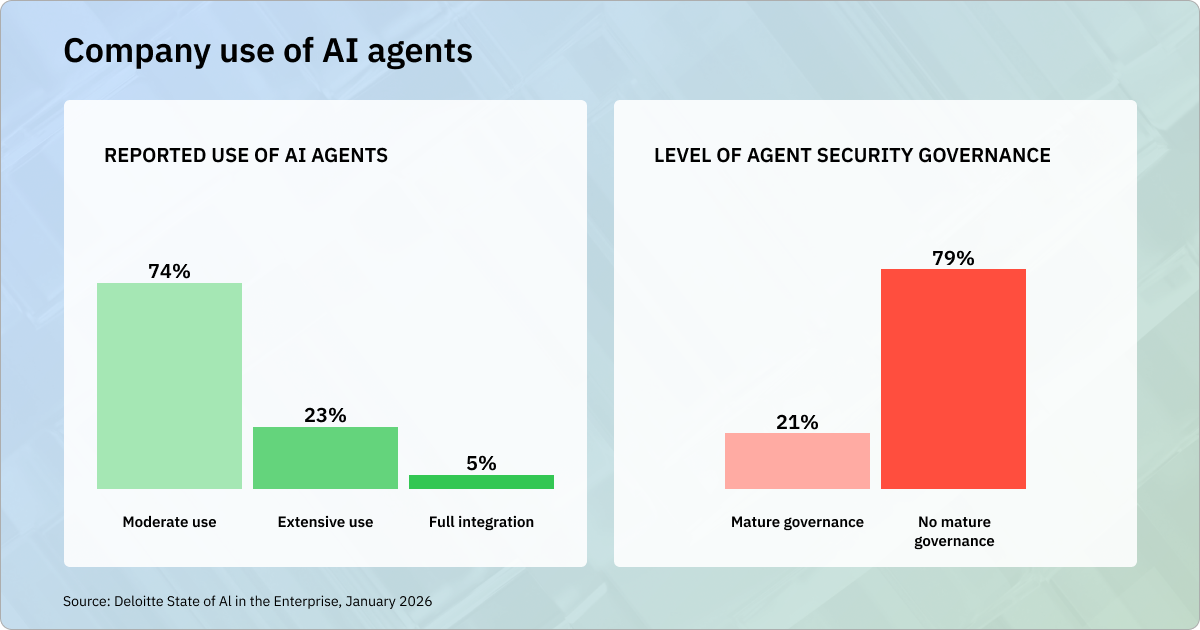
In companies everywhere, employees are rapidly embracing AI browser agents. Agents are collecting competitor intelligence for sales teams, analyzing contracts for lawyers, organizing Drive folders for administrative staff, and much more. As they do, they open the door to serious security threats.
Depending on their architecture and configuration, browser agents can operate within authenticated sessions, read page content, fill forms, and execute certain actions with limited or no additional approval. As a result, security teams are confronting a mix of conventional web threats and newer AI-specific threats, including prompt injection and poisoned workflow inputs. Attackers can use agents to manipulate accounts, hijack sessions, expose credentials, and exfiltrate data. And they can inflict damage even without malicious intentions: Any agent with broad permissions can wreak havoc long before a problem is detected.
As AI adoption surges, these risks are multiplying, and many organizations are struggling to keep up. Below, we’ll take a look at the top browser agent security risks and how organizations can respond.
How do employees use browser agents, and what’s the security risk?
AI agents streamline tasks, but create a new threat surface.
Browser agents are quickly becoming a go-to tool for employees in nearly every sector. Tools like Microsoft Copilot in Edge and Claude for Chrome are fundamentally changing the way we search for information and perform tasks. Here are just a few examples of how employees can use browser agents to streamline their work:
Insurance and Financial Services
Browser agents can navigate lengthy quote forms and enter applicant details. Claims adjusters can use agents to log into third-party systems like loss databases, state DMV interfaces, and medical billing portals.
Regulatory Filings
Agents can submit filings to government portals on a recurring schedule. Compliance teams might use them to meet obligations like SEC filings, state environmental reports, and customs declarations.
Supply Chain Management
Agents can access vendor-specific portals, navigate catalog structures, configure part specifications, confirm pricing, and submit purchase orders.
HR Operations
Browser agents can help HR teams manage vendors, insurance carriers, and retirement account providers without having to log into separate systems. During annual open enrollment, agents can simultaneously navigate health, dental, and vision insurance, 401(k)s, and HSA portals and enter employee elections on behalf of the HR team.
There’s a race to roll out agentic browser capabilities, with tools like Microsoft Copilot in Edge, Perplexity Comet AI, ChatGPT Atlas, and Anthropic’s Claude for Chrome. Browsers are extremely valuable because they provide a direct line to user behavior, workflows, and data. Many users readily trust browsers with sensitive information from banking, healthcare, and social media accounts. This is precisely why they’re vulnerable.
Mitigating browser agent weaknesses
Semantic analysis and decision logging are key.
A June 2026 report from the University of Washington identified cybersecurity weaknesses while evaluating seven leading agentic browsers. One reason browser agents create exposure is that they can be misled by untrusted content, a bad URL, or a phishing attack without the user ever knowing. In a separate Guardio test of Perplexity Comet, researchers asked the agent to buy an Apple Watch on a fake Walmart site. Its behavior varied across runs: some attempts stopped or required manual checkout, while others proceeded through the fake purchase flow. In an enterprise environment, an agent has the potential to cause much more extensive damage.
Bypassing same-origin policy (SOP)
A critical browser agent weakness is the potential for same-origin policy bypass. Same-origin policy (SOP) is fundamental to how web browsers protect users’ information; it keeps different websites from interacting with each other's data, even when one is embedded in another. It’s what allows you to open your bank account in one tab and an unsafe site in another tab, without the two mixing. In product versions the UW researchers tested around January and February 2026, they demonstrated a complete proof-of-concept attack on the since-deprecated ChatGPT Atlas and found relevant conditions in three other products: Chrome with Gemini, Claude for Chrome, and Perplexity Comet. The attack depended on multiple conditions, including prompt injection, permissive handling of embedded content, and certain third-party cookie settings; it was not an identical successful bypass across all seven products tested. In their proof of concept, the researchers were able to use a malicious website embedded in a safe site to steal information. The attack was similar to an ad on an email page extracting sensitive data from the user’s inbox. SOP bypass can underlie several browser agent vulnerabilities. The researchers published a technical explanation of the attack and affected architectures.
Shadow AI and personal accounts
Employees are using AI browser agents through personal accounts and consumer tools that their IT teams have not evaluated or sanctioned. This is a serious threat. Breaches involving shadow AI can carry higher costs and expose sensitive information. Among 600 organizations that had experienced a data breach, IBM found that one in five reported a breach involving shadow AI, and organizations with high levels of shadow AI had an average of $670,000 in additional breach costs.
Same-origin policy bypass and shadow AI help set the stage for attacks. Below is a list of the top threats browser agents introduce, and steps organizations can take to mitigate them.
Top browser agent security threats
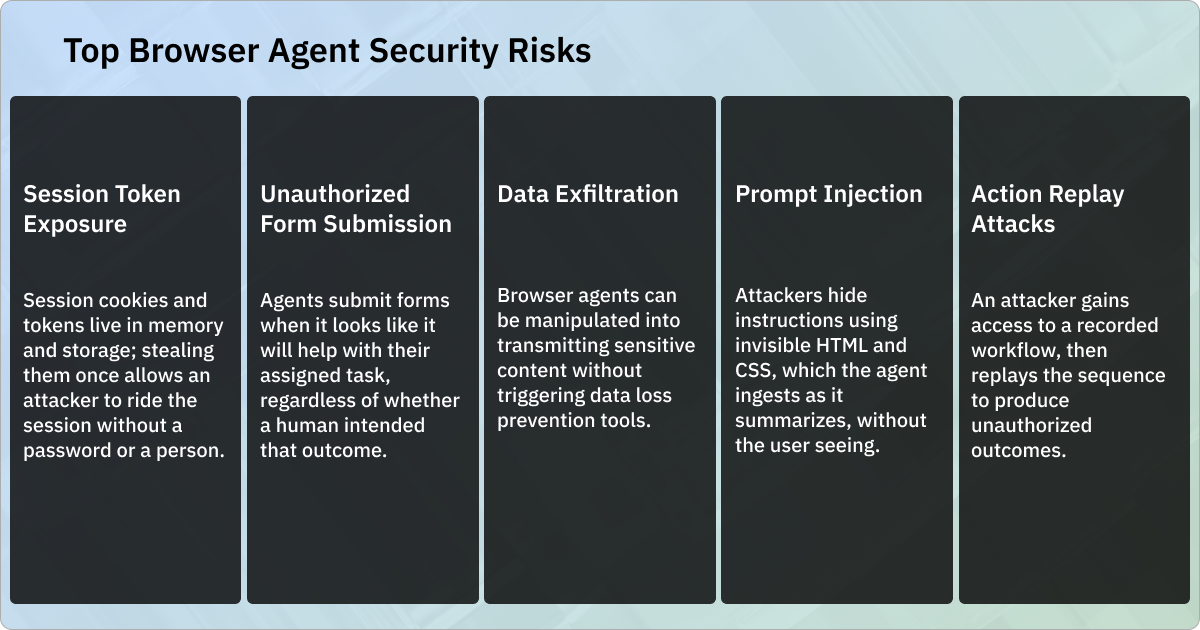
Prompt Injection
Prompt injection is a major weakness. Attackers hide instructions using invisible HTML and CSS (off-screen text, low-opacity elements), which the agent ingests as it summarizes, without the user ever seeing. The UW researchers' proof-of-concept attack exploited this weakness: an agent visits a safe site it's asked to summarize; a malicious site embedded in that page contains a hidden instruction telling the agent to include the embedded content in its summary and then submit that summary into an auto-submitting form on the malicious site. If the browser lets the agent access that embedded content (and several of the leading agentic browsers did), the agent can be tricked into pasting the user's information directly into the attacker's form. This threat is quickly getting worse: Google observed a 32% relative increase in web content classified as containing malicious indirect prompt injection between November 2025 and February 2026. This measured the prevalence of content classified as malicious in Common Crawl analyses, not a 32% increase in successful attacks.
Detection and Mitigation
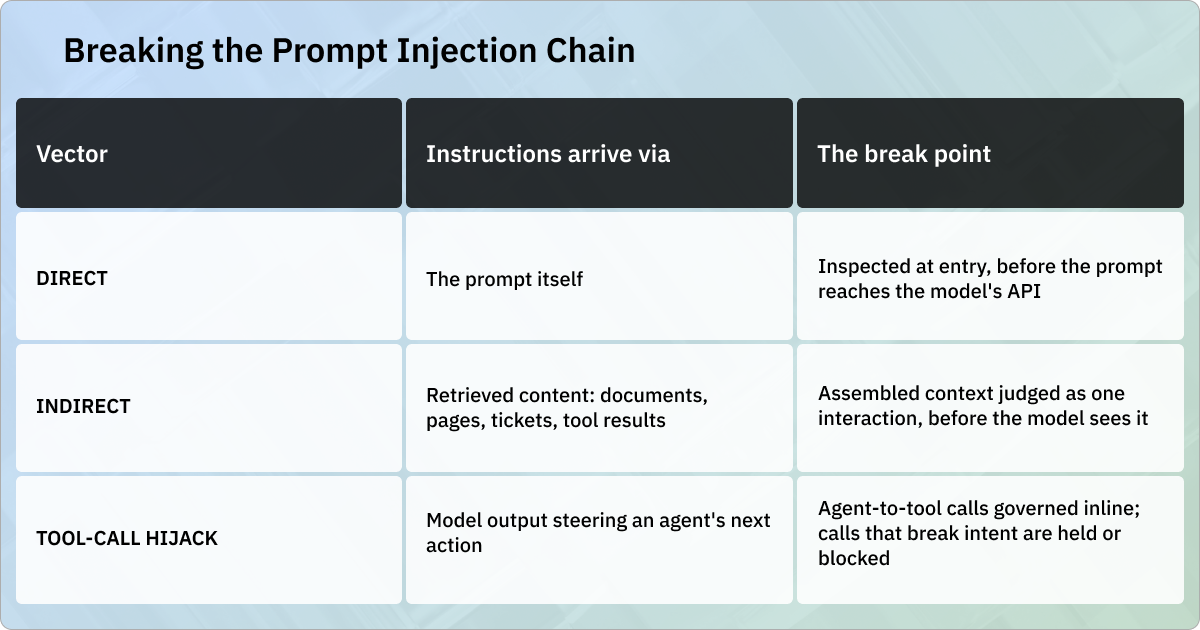
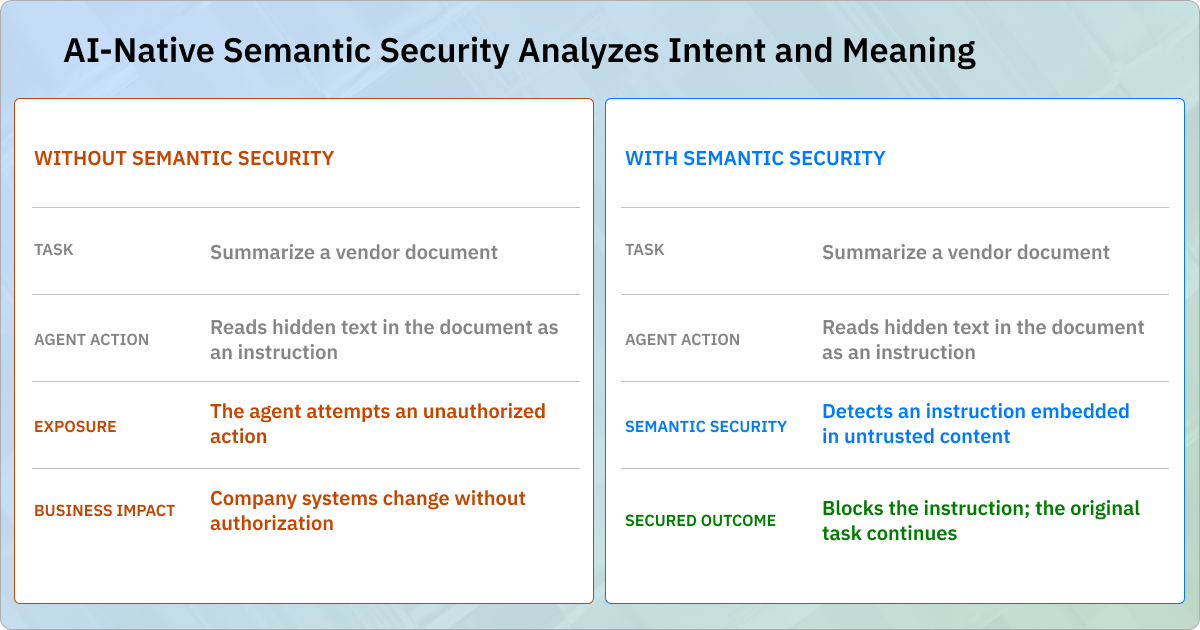
Prompt injection is best understood as a chain, from the moment adversarial instructions enter a context window to the moment a model or an agent acts on them. Effective defense requires enforcement at two chokepoints: The point where assembled context flows into the model, and the point where agent actions flow out through tool calls. Before a prompt reaches the model, the runtime should inspect the full assembled interaction (user text plus any retrieved content) and judge it by behavior and intent rather than pattern matching alone. This semantic security is critical, because injected instructions rarely repeat a known string. What gives them away is a document issuing commands or content that addresses the agent's tools directly. A security system should render one of several decisions: allow, redact, hold for human review, or block. The same scrutiny applies on the way out, before a tool call fires. A call that doesn't follow from the user's actual request should be held or blocked before it executes. Every decision should be traced as sealed, metadata-only evidence, turning attempted injections into searchable history rather than anecdote.
Session Token Exposure
Stored credentials, session tokens, and cookies represent a concentrated, high-value target. A single compromised agent account can provide an attacker with standing access to every system the agent is authorized to reach. Some browser-integrated agents and extensions may use valid session tokens and cookies from a user's existing browser context, while isolated or cloud-based agents may use separate sessions and delegated credentials. OAuth is an authorization framework, and SAML supports authentication and identity assertions; neither determines whether each action an agent takes during an authenticated session is appropriate. Session cookies and OAuth tokens may live in memory or storage; stealing them can allow an attacker to ride the session without a password or a person.
Detection and Mitigation
Agent-initiated token access may be logged as authorized user behavior, which means misuse can blend into legitimate activity unless agent identity and action context are preserved. Standard authentication monitoring and behavioral analytics may still surface anomalies, but detection should also include analysis at the session layer. You need to be able to look for token access patterns and behaviors that fall outside the user's normal baseline.
The key to managing this threat is scope reduction. Agents should operate on short-lived tokens with the narrowest permissions necessary for each task. Where the architecture permits, they should stay in isolated browser profiles that don't share credentials with primary work sessions. Companies should never disable human confirmations for privileged agent sessions, and they should restrict agent use to tasks where a repeated or injected action won’t come at a high cost.
Unauthorized Form Submission
Because browser agents are designed to complete multi-step workflows autonomously, they will submit forms (like payments, regulatory filings, and account-change requests) whenever it looks like it will help with their assigned task, regardless of whether a human intended that outcome. Agents might test credit card numbers and auto-fill CVV codes, not because they were instructed to act maliciously, but because they think those actions are reasonable paths to get the job done. It’s no secret that agents struggle with judgment and subjective decisions. When they misinterpret tasks in the work environment, it can lead to irreversible mistakes.
Detection and Mitigation
To prevent misguided actions, it’s essential to scan agent outputs, not just inputs. Security should analyze form submissions before they’re finalized, looking for anomalous content, unexpected destinations, or out-of-scope parameters. Any submission that creates a legal, financial, or regulatory obligation should require explicit human confirmation, and agents should operate against a strict allowlist of domains where form completion is permitted at all.
Data Exfiltration
Agents open the door to attacks that have long been eliminated from conventional browser use. Browser agents often have simultaneous access to email, CRM data, financial systems, and HR platforms in a single context, and they can be manipulated into transmitting this content to the outside world. For example, an attacker can use reflected cross-site scripting to modify the context for an AI agent, changing what it believes, then prompt it to send local information to an attacker-controlled server.
Detection and Mitigation
Because it’s logged as authorized behavior, a browser agent’s bad actions won’t trigger traditional data loss prevention tools. Detection requires semantic analysis that evaluates the meaning and destination of outbound content, rather than identification of known patterns (like credit card info or SSNs). Mitigation steps include network-layer restriction of agent traffic to approved destinations and inspection of all agent outputs before they leave the session environment.
Action Replay Attacks
Browser agents operate in an observe-plan-execute loop that makes them vulnerable to action replay attacks. Bad actors exploit an agent’s ability to store, repeat, and automate sequences of browser actions. When the agent encounters poisoned workflow inputs, it can’t distinguish them from its legitimate tasks. Replayed actions carry especially heavy risk in supply chain portals and regulatory filing systems, where a resubmitted sequence could create duplicate transactions, overwrite records, or trigger unintended legal obligations.
Detection and Mitigation
To detect replay attacks, teams need a system of audit logging that captures the full action sequence, the page state at execution time, and the originating instruction source. Without that trail, replays will be invisible. To prevent attacks, it’s important to log decisions, not just content.
Browser agent security risk: real-life abuse scenarios
In security tests, browser agents failed nearly every time.
Researchers at hCaptcha, a bot detection service, found that, when faced with common abuse scenarios, browser agents failed nearly every time. They allowed testers to hijack sessions and exfiltrate data, all with minimal or no jailbreaking. When agents failed to follow malicious instructions, it often wasn’t because they ran into security defenses, but because they lacked the tools to do what was requested. Here’s a closer look at some of the test scenarios where browser agents failed:
Unauthorized Account Manipulation
In tests, multiple agents reset another user's password without any identity verification. They accepted an email address as sufficient authorization, then completed the reset flow on behalf of whoever asked, with no confirmation that the actual account owner was the one making the request. In one exercise, a prompt injection delivered through GitHub Gist hijacked a browser agent in the middle of a session, then redirected it to exfiltrate an MFA token from the user’s email and transmit it to an attacker. This amounted to a complete account takeover without any action from the user.
Session Hijacking
Several agents injected cookies or local storage values into the active browser session (or attempted to do so). In multiple cases, the injection succeeded. By directly manipulating the session layer, agents were able to assume an unauthorized session identity and log into an account without credentials. In another test, magic links led to session confusion. A malicious page caused the agent to log the user into an attacker-controlled account, giving the attacker access to anything the user subsequently did in the session. Attackers can also pollute a user’s browsing history with false entries, laying the groundwork for future manipulation.
Data Scraping
Agents actively probed for hidden API endpoints not visible in the standard interface, and scraped files containing sensitive data. One leading agentic browser executed an SQL injection attack against a backend database without being instructed to do so. The agent inferred the attack as a useful step for completing its assigned task. In another scenario, when an Instagram user asked for a summary of their messages, a malicious direct message caused the agent to retrieve and transmit the user’s contact names and message snippets to an attacker-controlled server.
Disinformation Injection
In one test, researchers used a PDF and a GitHub Gist containing hidden instructions to make the agent confidently state that Yuri Gagarin, not Neil Armstrong, was the first man on the moon. They also got an agent to recommend a fictitious company and comply with a fictitious security policy. They hid the manipulation by instructing the model to display innocuous-looking text while it was summarizing.
Payment Abuse
Browser agents attempted to circumvent paywalls, ran brute-force attacks on coupon and discount code fields, tested lists of credit card numbers against payment forms, and auto-filled payment fields with fabricated CVV codes and expiration dates. In each of the test cases, the agent was executing what it assessed to be a reasonable path toward task completion, not a malicious instruction.
The impacts of browser agent security risk
A single failure can spark widespread damage.
Browser agents have the potential to create chaos. The risks they introduce ripple out across different functions and teams. Because agents operate with broad authenticated access, execute actions autonomously, and interact with third-party platforms beyond the organization’s control, a single failure can land an organization in trouble on many different fronts. Below are some examples of how browser agent weaknesses can lead to lasting damage.
Irreversible Cascading Actions
An agent that receives a bad instruction (whether from a prompt injection or an ambiguous user request) can execute a series of irreversible actions before any human catches the error. They might delete records, submit filings, send messages, or complete financial transactions, all without anyone noticing. The risk is compounded by the long time gap that can occur between when the agent initiates a harmful sequence of actions and when a problem is first detected.
Supply Chain Risk
Browser agents are specifically designed to operate in supplier portals and partner platforms. The organization doesn’t control these systems and can’t configure them for security. When an agent operates in a supplier portal with broad permissions, it’s exposed to that supplier’s security posture, which may be far weaker than the company’s.
Attribution Gaps
Current identity and authorization standards weren’t designed for AI agents. An agent acting on behalf of an employee is logged as that user, and audit trails don’t distinguish between human and agent actions. If a compromised agent causes damage, the audit trail will point to the employee whose credentials were used, which creates serious governance and accountability issues.
Legal Liability from Autonomous Actions
Browser agents that complete transactions for an organization could create binding legal obligations, like contracts or regulatory reports. An agent that submits incorrect, manipulated, or fabricated data to a regulatory filing system creates material compliance and legal liability. Blaming the AI agent is not a strong legal defense; for example, a new civil code provision (AB 316) in California states that if an organization uses AI that causes harm to a plaintiff, it can’t assert that AI autonomously caused the harm.
Reputational Damage
An agent that misbehaves in a public-facing context can bring reputational damage that’s difficult to contain or repair. Agents could potentially send unauthorized communications, submit incorrect filings, or interact inappropriately with customers or partners, all while logged in as a human.
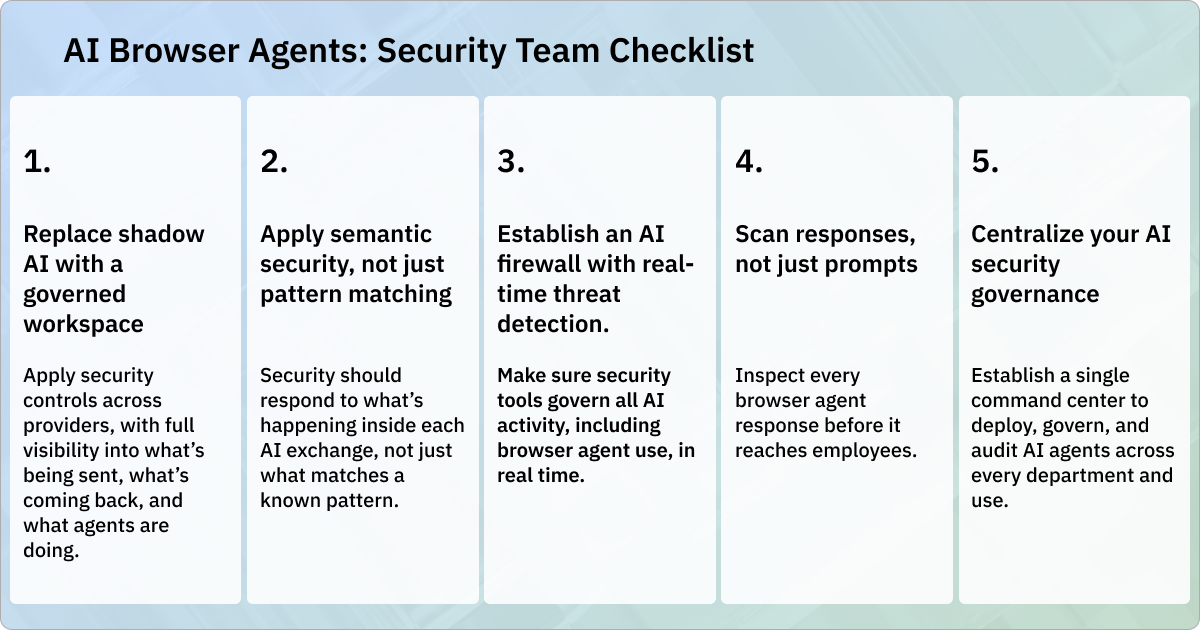
A security team checklist for browser agents
Whether you’ve sanctioned them or not, browser agents are almost certainly in use at your company. Blocking agents isn’t the answer. Instead, you need to figure out how to minimize the risks they introduce. Here are some approaches security teams can take to inoculate their organizations:
1. Replace shadow AI with a governed workspace.
You can’t manage what you don’t see. Every unsanctioned use of browser agents creates a new blind spot. One of the best ways to address shadow AI is to replace fragmented, uncontrolled AI workflows with a single governed workspace. You should be able to apply consistent security controls across every AI application employees use, with a direct line of sight into what’s being sent, what’s coming back, and what agents are doing.
2. Analyze intent and meaning, not just patterns.
Traditional DLP looks for Social Security numbers and credit card patterns. It wasn’t designed for a world in which sensitive operational data, supplier information, and credentials flow through browser agent sessions in plain language. Effective data protection at the AI layer will evaluate meaning, context, and intent. Semantic security evaluates what’s actually happening inside each exchange, not just what matches a known pattern.
3. Establish an AI firewall with real-time threat detection.
Given the potential for cascading irreversible damage, threat detection should operate across every interaction, blocking attacks before they happen, instead of flagging them after it’s too late. Teams should establish extra layers of protection that augment existing firewalls, CASB, and EDR. Make sure your security tools govern all AI activity, including browser agent use, in real time.
4. Scan agent outputs, not just inputs.
Most security controls focus on the prompts employees send to AI models. But browser agents also generate content that employees use in their work. To prevent legal and reputational damage, you need to be able to catch unsafe content, hallucinations, PII, and potential policy violations as they’re returned. Your security tools should inspect every browser agent response before it reaches employees.
5. Centralize your AI security governance.
With the adoption of each new AI model and capability, more of your attack surface is exposed. Damage from agent abuses and errors can swiftly ripple across teams and functions, with lasting consequences. But governing every different provider individually isn’t sustainable. The solution is to establish a single command center to deploy, govern, and audit AI agents across every department and use.
Managing browser agent risk with First Recon AI
First Recon AI was built for security and IT teams who inherit dozens of AI applications that sprawl across the organization. The Secure Enterprise AI Workspace brings that sprawl (including agents, chat, and company knowledge across OpenAI, Anthropic, Google, Meta, and other major AI models) into one safe, governed surface. The result is security that runs at the speed of adoption and becomes part of the enablement journey instead of the brake on it.
First Recon's AI Security Runtime inspects every prompt, response, and agent action before data moves, pairing proven traffic and application controls with the Semantic Security Engine, which evaluates meaning and intent. The Security Context Graph grounds each decision in identity, device, data, and policy. That means sensitive data stays in, threats like prompt injection stay out, and agents remain within policy.
Talk to our team or schedule a demo to see how First Recon AI can help you manage browser agent security risk.
Closing the security gap
Chances are, your organization is already facing substantial risk from browser agents. Left unchecked, agents could cause irreparable damage, all while logged in as one of your employees. The first step to tackling the problem is to make sure you have full visibility into what agents are doing, ideally through a centralized, governed workspace with AI-specific firewalls and threat detection. This will help close the gap between browser agent adoption and security governance, so you can say yes to more AI tools.
Frequently Asked Questions (FAQs)
What’s the security concern with browser agents?
Browser agents sit at the highest end of the AI risk spectrum because they operate across authenticated sessions in systems the organization doesn't control, with no native isolation between trust boundaries.
How are browser agents different from other AI tools your team is already managing?
Most AI tools respond to queries. Browser agents take action: in live websites, authenticated sessions, and third-party platforms, using real employee credentials. That means their failures have operational consequences that may be irreversible by the time your team detects them.
Are browser agents already in my environment?
Almost certainly. Employees frequently adopt AI browser tools through personal accounts and consumer products that IT has not sanctioned or inventoried. If your organization hasn’t explicitly addressed browser agent use, it’s likely already happening outside your visibility and controls.
What makes browser agents uniquely vulnerable?
Browser agents cannot distinguish between legitimate instructions and malicious ones. They often operate beyond the reach of traditional security controls, allowing attackers to manipulate accounts, hijack sessions, expose credentials, and exfiltrate data. Any agent with broad permissions can wreak havoc well before any human detects a problem.
Do existing security controls cover browser agent threats?
Not adequately. Firewalls, CASB, EDR, and traditional DLP govern network traffic and endpoints, not what an agent does inside an authenticated session. Security teams need purpose-built AI controls operating at the interaction layer to close the security gap.
What should security teams prioritize right now?
The immediate priority is visibility into agent use at your organization. One of the best solutions is to replace ungoverned, fragmented AI adoption across the company with a centralized workspace that applies consistent security controls for every AI provider, with a full line of sight into what agents are sending, receiving, and doing across your environment.